
This post is one of many I’ve made about my personal colocation setup. You might also be interested in updates I’ve made in 2024 and 2025.
The opportunity#
Thanks to some generous work perks, I’ve got the opportunity to colocate some gear in a proper datacenter with:
- 20 amps of redundant power
- monitored cooling with hot/cold aisles
- unmetered 10Gb of bandwidth
- a public
/29IPv4 block
All inside my own secure 10U quarter-rack cabinet.
My actual homelab is pretty modest but does its job fine. All my colocation gear is spare hardware I had laying around, aside from the fancy 10Gb Arista switch. Another work perk meant that I got to install a 1Gb wireless point-to-point radio between my apartment and the datacenter itself. A friend had floated the idea of setting up a layer 2 tunnel between my homelab and colocation but that’s a future project.
The amount of pictures I’ve taken, excluding all the ones I took of out-of-focus cable labels, properly reflects my level of commitment to this initial setup.
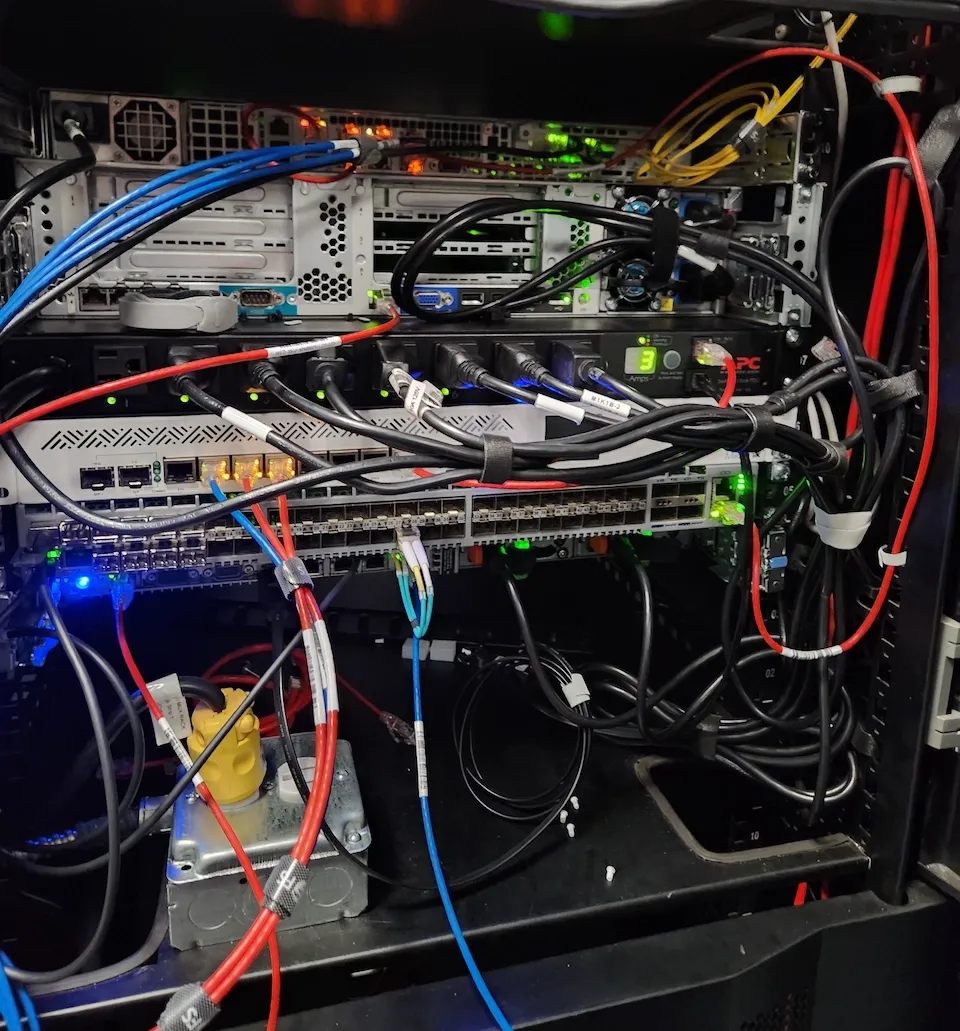
Initial install before the cable management situation got any dignity.
From top to bottom of my rack at the start of my colo journey this year, I’m running:
- Generic Supermicro 1U server running OPNSense (4 cores, 16GB DDR3)
- HP DL380p Gen8 running Proxmox (20 cores, 128GB DDR3)
- APC AP7900B PDU
- MikroTik CCR1009-7G-1C-1S+
- Arista DCS-7050SX-64-R
- Dell Poweredge R630 (36 cores, 192GB DDR4)
My foray into 10Gb networking#
Router/firewall#
I didn’t have any spare gear for handling a 10Gb WAN setup so I bought a 1U Supermicro firewall off a friend that came with 16Gb of DDR3 ECC UDIMM memory and a E3-1270v3 CPU. With an SSD sorted, I installed OPNSense and got to work on benchmarking. In the case of getting my actual uplink connection from my colo provider, it was just a simple case of configuring my static IPv4 and IPv6 assignments on my WAN port which I did before I went to install my gear.
I didn’t expect to hit 10Gb speeds right out of the gate but I thought I’d at least be close.
- No matter what combination of iperf3 flags I chose, I wasn’t able to get above ~2.2 Gbps when running unidirectional tests within the same local network. Tests included port setups between hosts connected directly to the firewall’s NICs and the downstream switch without much variance. Tests between hosts with layer 3 routing on just the switch had good 10Gb tests.
- Testing iperf3 out my WAN connection to other public iperf3 instances I had setup, including a 10Gb Debian host on the same datacenter, didn’t fare much any better than my LAN tests.
- My last hope to maybe find a bad config on my side was testing via the Ookla speedtest.net CLI tool to multiple servers, including a speedtest.net server that also lives in the same datacenter. No luck…
I found a helpful ServeTheHome forum post after I went down my benchmarking rabbit hole which confirmed some of my suspicions:
- pfSense/OPNSense isn’t necessarily optimized for 10Gb traffic on my generic hardware. vyOS should have some performance gains but I’ll still struggle reaching 10Gb speeds and the OS will be much more hands on.
- Upgrading the CPU won’t result in any meaningful performance gains.
- Intervlan routing is going to be < 2 Gbps, maybe worse depending on overall system load.
- Using the 10Gb copper ports for switching is a bad idea if I care about performance (not a huge deal for my usecase but I was a little interested in them when I bought the server).
- Idle power usage is not good (~100W) without tinkering. This doesn’t really impact me with my allocated colo power but it’s certainly annoying with the performance I’m getting.
I’ll stick with this lemon for now because I’m stubborn but I’ll upgrade it the first chance I get.
Switch#
Since I had the opportunity for a 10Gb WAN link, I opted to go all in with a beefy 10Gb LAN setup. Around the time I was getting ready to move my gear in, I stumbled on deal for a secondhand Arista DCS-7050SX-64-R with x48 10GbE SFP+ and x4 40GbE QSFP+ ports for about $200 USD. This included twenty BLADE 10Gb SFP+ modules and an Arista EOS license.
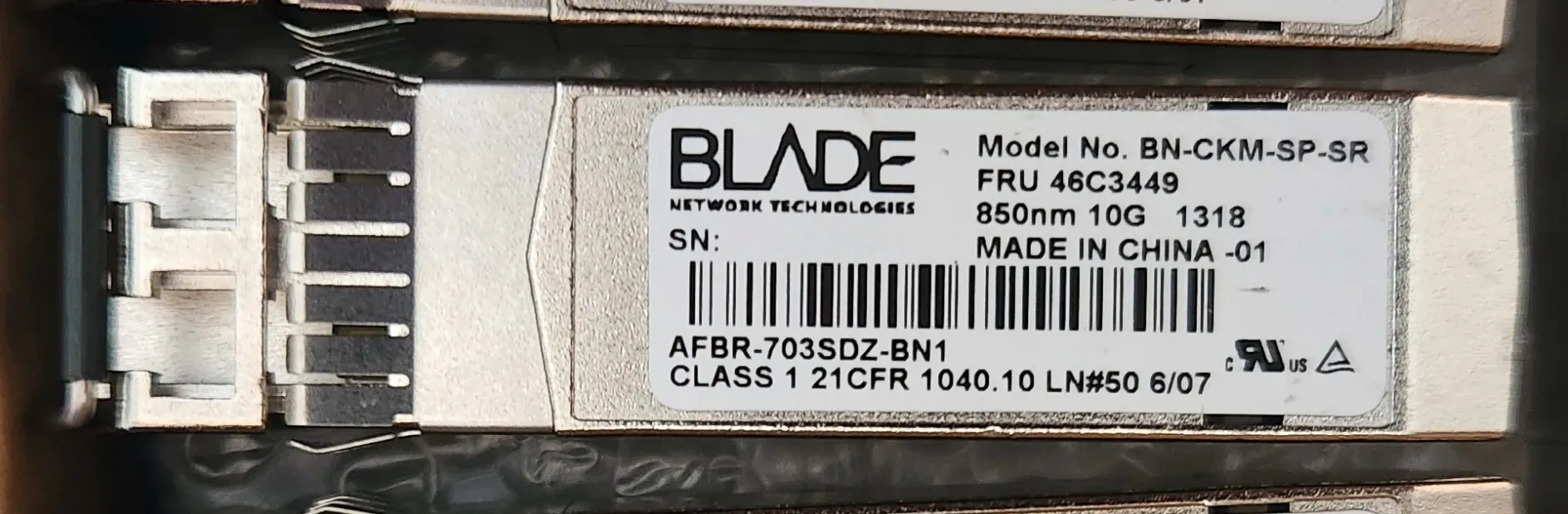
One of many ancient BLADE network optics from 2006 that came with my Arista switch.
Like a lot of used enterprise hardware, it didn’t include rails which cost about as much as the switch when you buy them separately so I recycled some generic-ish platform rails.
This was my first experience with Arista’s EOS CLI; until now, most of my switch CLI experience had been with older Cisco gear. The configuration model was extremely similar. I particularly enjoyed getting access to a Bash shell for scripting and troubleshooting as it wasn’t something I’d had before.
I was a little worried about the third-party transceivers I had purchased with the switch. A friend had picked up the same deal that I did but ran into issues with FS.com optics being recognized. That was when we found that you needed a certain license string to enable support. Allegedly, there’s some workarounds for this but those methods stopped working on older firmware than we were running (or had access to). I lucked out and had the license string enabled while my friend ended up flashing his optics to spoof them as Arista-branded.
NIC issues#
Another 10Gb hiccup I encountered was using my third-party transceivers with an Intel x520 SFP+ NIC on my R630 Proxmox host. Apparently Intel thought it’d be a good idea to artificially blacklist “unsupported” transceivers. Lucky for me, there’s community documentation to work around this. All you have to do is patch the NIC’s EEPROM with a simple Python script on the host where the NIC is installed.
Management networking#
My management needs aren’t that crazy so for now, I’m running everything through a MikroTik CCR1009-7G-1C-1S+ setup as a switch. This traffic includes things like my Proxmox management interface, server management (IDRAC, ILO), power management, and SSH for my core Arista switch. In the future, I’d like to have some redundant WAN access to this switch so that it’s truly out-of-band but that’s not priority just yet.
I chose this switch because I got a deal on it from a friend and wanted to get familiar with the OS. Coming into this, I’m not a huge fan of MikroTik’s RouterOS. I think the CLI is convoluted and the alternative management option, Winbox, is a standalone GUI application that is a pain to get used to (we don’t talk about the web interface). Hopefully that’ll change the more I use it.
Mid-year hardware updates#
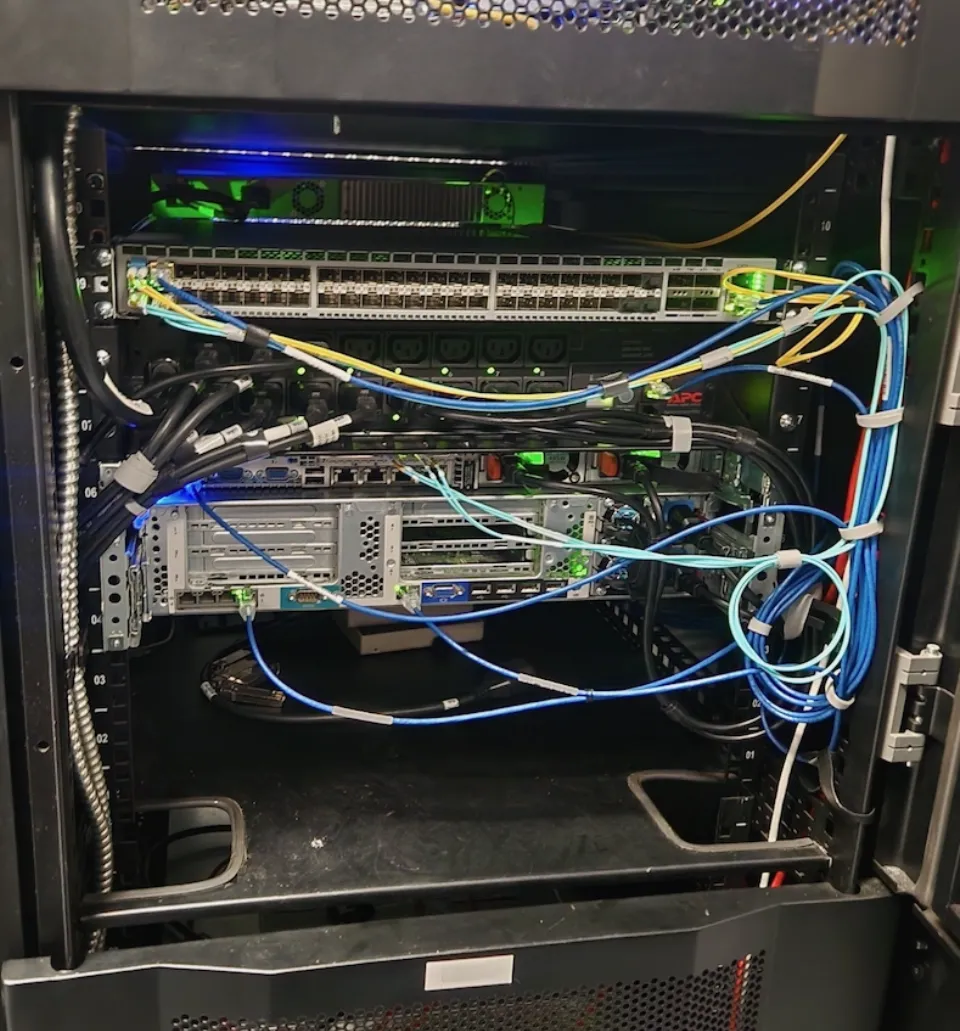
A later pass at the rear of the rack, with more gear in place and the cabling slowly becoming less theoretical.
Upgrading my firewall#
After getting sick of my measly 2Gbps WAN performance, I went looking for a replacement firewall/router.
I briefly considered another open source setup with either OPNSense, pfSense, or VyOS on hardware that wasn’t based on a 10 year old CPU but opted against it:
- Going this route with any hardware was in the ballpark of $300 USD if I wanted to stick with any rackmounted gear. I also limited my search to hardware with built-in management like IDRAC.
- On the OS front, I’m not a huge fan of pfSense’s history related to licensing. OPNSense has a pretty rough interface. VyOS being a mostly CLI-only interface isn’t something that I’m very interested in learning, especially since I don’t see myself deploying outside of a lab setup anyway.
- I do have a 10Gb RouterOS license I could use on this type of setup but it didn’t seem like a cost-effective approach with the hardware investment I’d have to make anyway. The license alone is $100 USD and isn’t easily transferable.
Ultimately, I went with a secondhand MikroTik CCR2004-1G-12S+2XS from a friend. I already have the experience with RouterOS via my management switch (and at my day job) so I’ve got a decent idea of how painful this should be. On the plus side, this has redundant power supplies which meant I had to rethink my rack’s PDU (fancy power strip) situation.
Right out of the gate, I was able to hit 10Gb speeds in the same iperf3 scenarios I was testing on my Supermicro firewall without any config or hardware tuning. My ACL setup isn’t too extensive so it’s possible that I’ll see worse inter-VLAN routing as I continue building things out.
Increasing PDU capacity#
To connect both PSUs on each of my redundantly powered devices, I upgraded to a 2U APC AP7911A with 16 C13 outlets and built-in network management. After plugging in all my gear, I had seven unused outlets: enough for three more dual-PSU servers plus a final spare.
That is enough capacity for now. If I do need more in the short term, I could use C14-to-C13 power splitters or I could stop connecting every redundant PSU. Both options are a little too janky for my liking. Plus I paid a premium for all the fancy enterprise gear with its extra power supplies so I might as well do things right.
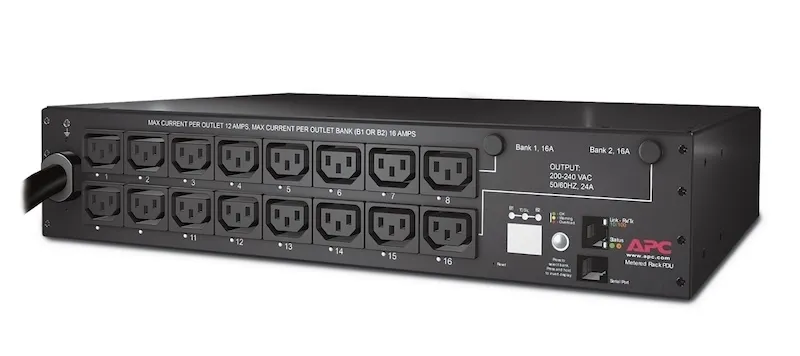
A better view of the PDU that I upgraded to (Source: Schneider Electric).
Connecting both PSUs to a single PDU protects against a failed server power supply, but it does not protect against the PDU itself failing. In an ideal setup, I would have two PDUs connected to separate power feeds, with each device’s PSUs split between them. My datacenter provider handles upstream power redundancy transparently, so a second PDU would primarily protect me from a failure inside my own cabinet.
Unfortunately, another 2U PDU would take up too much of my limited rack space. A vertical PDU is the obvious alternative, but fitting one into this cabinet while keeping the cabling tidy would be difficult. Short vertical PDUs exist, but managed models that fit the cabinet are expensive and I do not have a good place to mount one anyway.
Rethinking rack layout#
When I was originally getting my rack sorted, I was a little too eager to move in. The previous tenant had a two gang outlet box installed which interfered with the bottom 4U of my rack space. Once that was out of the way I had more freedom for gear and cable management.
More power, more problems#
With the new 2U PDU setup, I’m limiting my usable space quite a bit. Even though the PDU itself is very shallow, I can’t install any full-depth hardware or rails in the same area. I can recoup some of this “wasted space” by installing gear that only mounts to the front of the rack like smaller network switches and lightweight server appliances (with some airflow/temperature caveats). Short-depth servers like a Dell R430 could fit but their rail kits take the full depth to be installed.
I opted to move my MikroTik 1009 to the front of the rack, sharing 1U of the 2U that the PDU takes up. This works for me because the 1009 doesn’t produce a lot of airflow that might struggle to get exhausted out the back of the rack past the PDU. I did check that there wasn’t any noticeable difference in ambient temperatures on the switch after moving it.
”Cable management”#
While I was at it relocating my management switch, I also moved my core Arista switch to the top of my rack so that cabling to/from servers was sensible. I also moved my 2U HP server down to take the place of the old switch locations.
On the topic of cable management, there’s not a whole lot I can do because of the limited cabinet layout. Outside of dropping $100+ USD on 5 different lengths of ethernet, fiber/DACs, and power cords, this is good enough since it’s not really impacting temps or access to hardware.
Colocation review: how it stacks up to hosting at home#
Compared to my homelab setup, my colo is actually pretty cost effective even before any sort of discounts I get from my day job. Here’s a breakdown of what costs start to look like for my residential setup:
- My colo gear peaks around 1000W of power, averaging ~60% of that capacity every 24 hours. At my $0.12 kWh residential rate, that’s around $50 USD per month.
- I’m “fortunate” (in the US at least) that 1Gbps unlimited bandwidth costs me $100/month before any discounts, even if I do use it for more than just homelab activities.
- Pricing power redundancy at home is a little tougher. I previously picked up a refurbished APC 1500VA 1200W UPS (SMX1500RM2UNC) for $500 which was a good deal at the time. Spread across one year, that’d break down to $42/month before factoring in battery replacements.
It’s hard to extrapolate certain benefits like a /29 IPv4 block, unlimited 10 Gbps bandwidth, and the lower latency you expect from a colocation. With all that said, a residential setup for my gear comes out to around ~$190/month based on the costs I outlined. Not including IPv4 space and bandwidth, that’s equivalent to how much I’d pay for my secure 10U colo without any discounts. Considering my gear is pretty wasteful in terms of how dense my available compute is, and that I’m using just under half my allocated power budget, I’m pretty happy with everything.
If I didn’t live nearby and planned on either tinkering or breaking my setup on a frequent basis, I could see this setup being less appealing. Even then, it’s not that difficult to schedule a visit or get remote hands support.
What’s next?#
My next major project is building a new NAS since I’m running low on space with my measly 36TB home setup. Colocating it makes sense for the power savings alone. Having access to the 10Gb network should make it much more useful too.
I’m still not happy with my firewall setup. RouterOS works, but its configuration is awkward enough that I have to relearn parts of it whenever I return every few weeks to push a change. A “real” enterprise firewall from vendors such as Fortinet and Palo Alto are difficult to justify once hardware and licensing costs are included ($5k+ if I’m lucky), while my concerns about Netgate rule out another pfSense appliance. For now, I am stuck choosing the option I dislike the least.
Since I’ve got spare space and power, another thing I’d like to spend time experimenting with are highly available services. Upcoming hardware refreshes for a few consulting clients may give me enough equipment to build those environments properly and make better use of my rack.