
This post is one of many I’ve made about my personal colocation setup. You might be interested in my post from 2023 or my latest update in 2025.
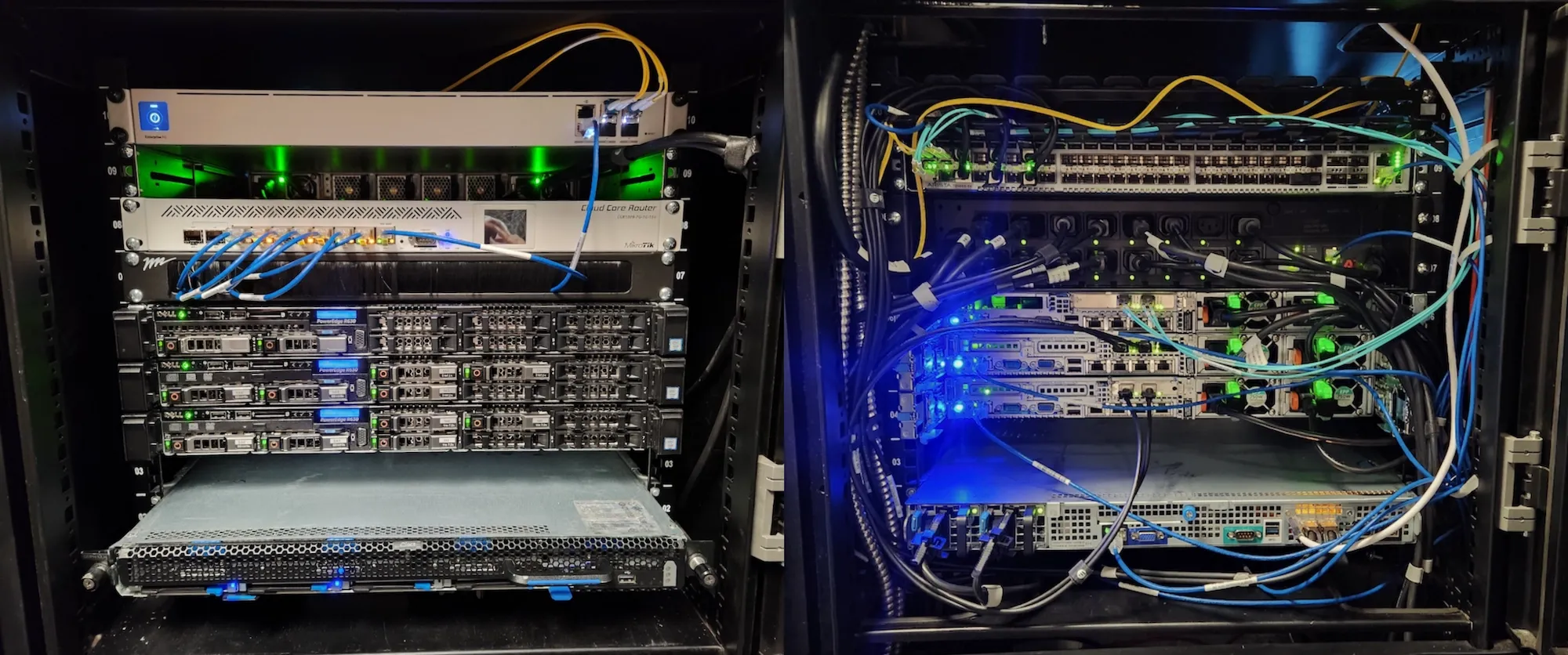
The latest and greatest state of my current rack setup.
Over this past year, my main focus for my colocation gear has been moving towards a more production-ready setup with a beefy NAS, another firewall upgrade, and enough compute for some high availability deployments. As of writing this, my colocation includes:
- Ubiquiti EFG for firewall/routing
- MikroTik CCR1009-7G-1C-1S+ as a switch for my management network
- Arista DCS-7050SX-64-R as my core switch
- x2 APC AP7911A PDUs
- x3 Dell Poweredge R630 Proxmox servers
- Quanta D51PH-1ULH server running TrueNAS Scale
New NAS setup#
Hardware#
Since my last update, I ended up building a new NAS for myself. As I was still well within my colocation’s power budget and I didn’t have to worry about how loud the thing would be, I sprung for a refurbished Quanta D51PH-1ULH server. These puppies can hold twelve 3.5” drives in a single, very long, 1U form factor. I was a little concerned about the 35” length so I double checked my colo cabinet’s usable depth before pulling the trigger.
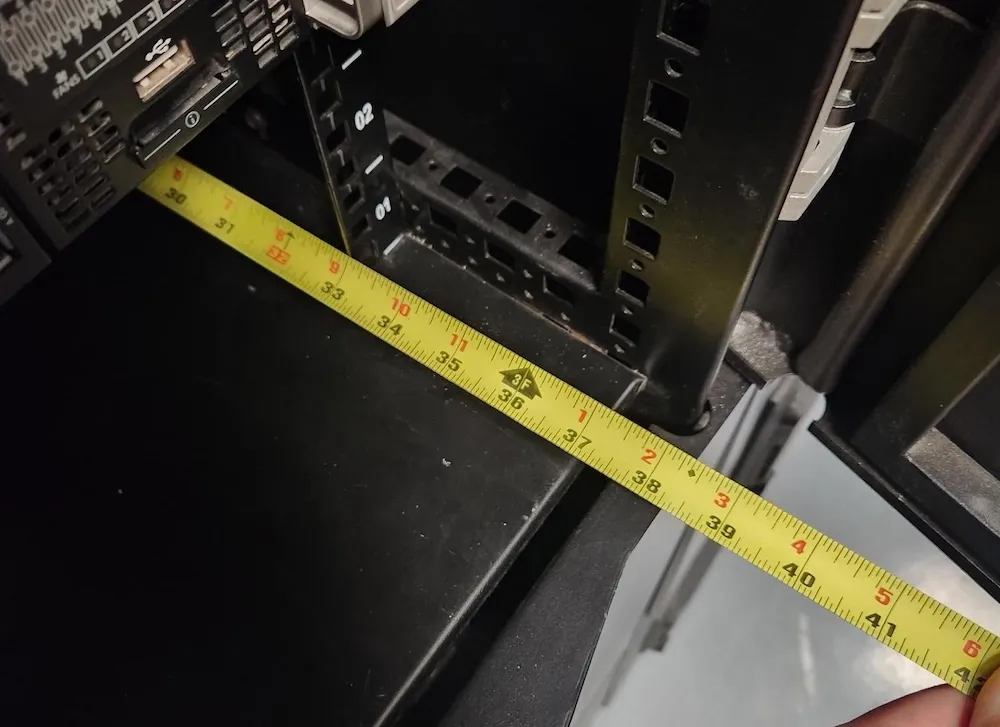
My tape measure is latched onto the bottom lip here at the back of the cabinet. With both doors closed, I could expect about 1” spare depth for any power or networking cables.
I bought mine along with a local friend so that we could get a small bulk purchase discount and to save a bit on shipping. Each unit came out to $225 USD which included:
- All the 3.5” and 2.5” drive trays
- Mounting rails
- Dual 700W PSUs
- Quanta QS3008 12GB RAID controller (DAS2BTH48A0)
- Quanta SAS expander card (DAS2PHTH8B0)
- Mellanox NIC with dual 25GbE SFP28 ports (CX4421A)
- Dual Xeon E5-2630v4 CPUs (10 cores, 20 threads @2.2GHz, 3.1GHz boost)
I sourced 128GB of ECC DDR4, six 32GB DIMMs (HMA84GR7MFR4N-UH), separately for $160.
Shipping damage#
When the servers showed up, one came in perfect condition while the other wasn’t so lucky. The seller got lazy with their packing job which resulted in mostly cosmetic damage: some deep scraping by the rails on top the server and a bent rack ear on the front.
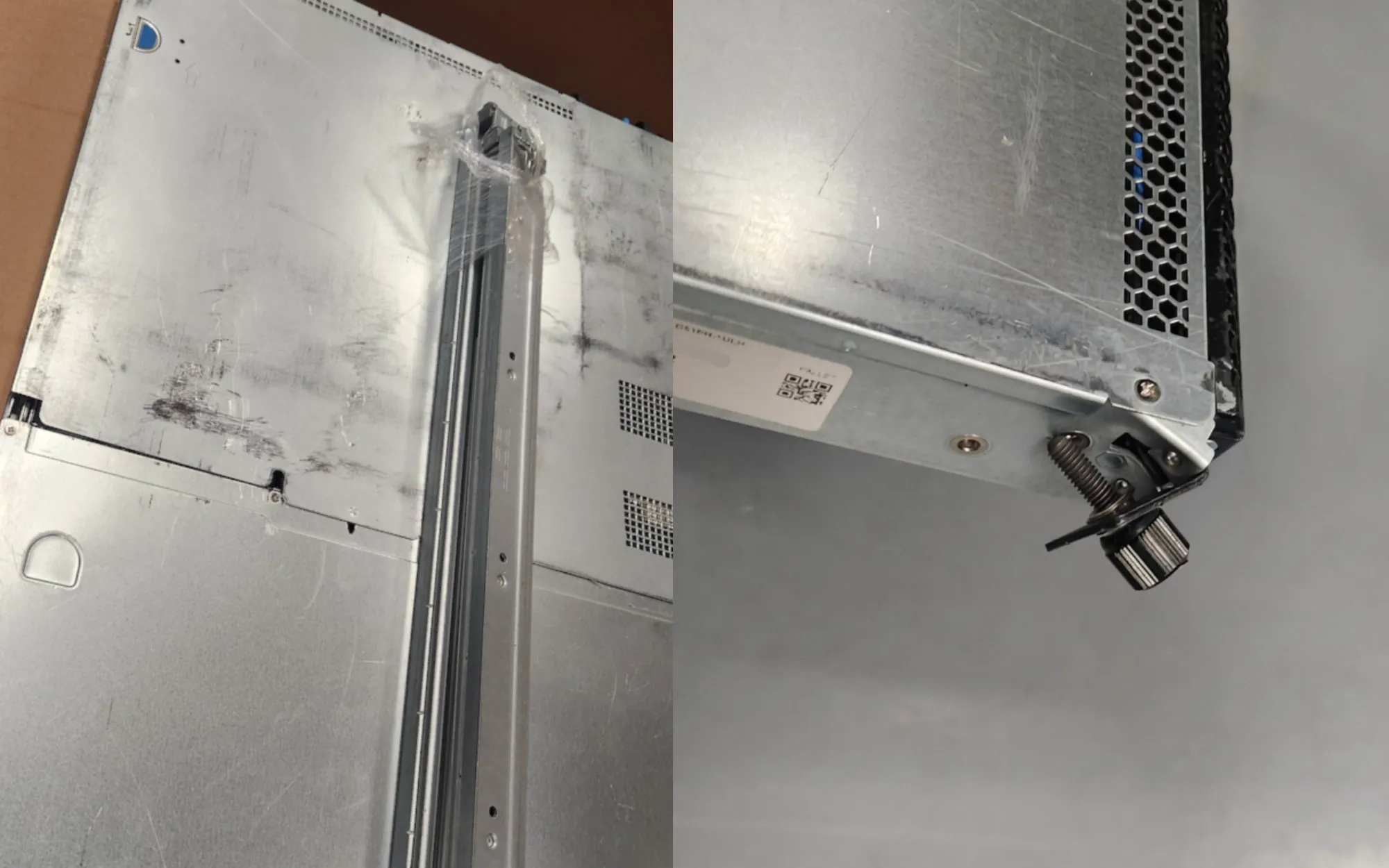
Not too much damage, certainly nothing to get too bent out of shape over. I did have to persuade the sliding drive tray at first since it got stuck on the broken rack ear.
I chose the worse off server so that I could give my buddy crap about being the nicer person.
Being rather impatient, I went ahead and installed my drives in the server and got my new NAS up and running before we heard back from the seller about any sort of remediation. In the end, they let me choose between a $125 credit for the damage or I could ship the server back at my own cost and they’d send me another server.
Kind of sleazy that they’d force me to pay for their mistake (I’m guessing they skimped on shipping insurance) but I was happy to take the credit since the damage was only cosmetic. This brought my server cost down from $225 to $100. Probably not the smartest choice in the long term but that alone almost covered my RAM costs.
Storage pool#
I ended up buying twelve 16TB renewed hard drives from a well known vendor, GoHardDrive, for $1,640 for 192TB of raw capacity which came out to about $8.54/TB after taxes. This was my first time buying any sort of renewed or refurbished drives so I was skeptical but ultimately the 5 year warranty and price helped me justify it. A short SMART test on all the drives before I installed them showed zero issues as well.
The drives are split into two six-wide RAIDZ2 vdevs for my storage pool, giving me 128TB of usable space. Worst case scenario, I can lose 4 drives in my pool and be safe as long as no more than 2 drives fail within the same vdev.
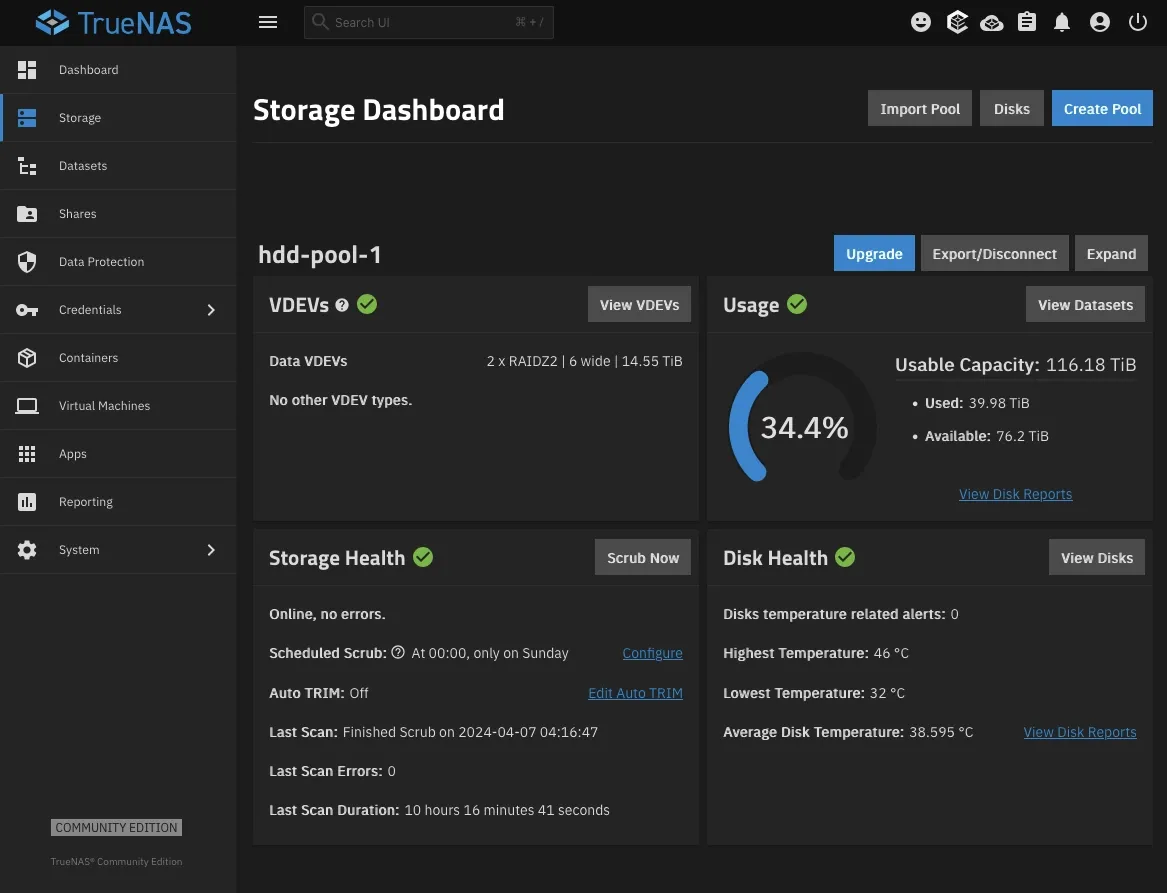
My HDD pool up and running inside TrueNAS.
For the OS, I went with TrueNAS Scale on two 256GB mirrored SSDs serving as my boot pool. TrueNAS doesn’t need this much space, I just didn’t have any smaller SSDs. I already have two TrueNAS Scale hosts that I’ve worked on repeatedly and they’ve worked as great for a basic storage host setup. My main gripe with TrueNAS is the confusing permission system menus related to NFS and SMB shares but that’s a non-issue for me now with Terraform and Ansible handling that for me.
Compared to other popular storage-first operating systems, TrueNAS Scale was the better fit for me. I don’t plan on using that many hosted applications on my colo NAS host outside of an S3 object store so options like Unraid didn’t make sense. Since my setup is relatively basic, I could’ve opted for something basic like Debian plus Docker but I’ll admit that I caved for the GUI, even if I didn’t plan to use it on a regular basis. Any “real” applications I want to deploy are going to be handled by my Proxmox environment with the only exception being a MinIO S3 instance.
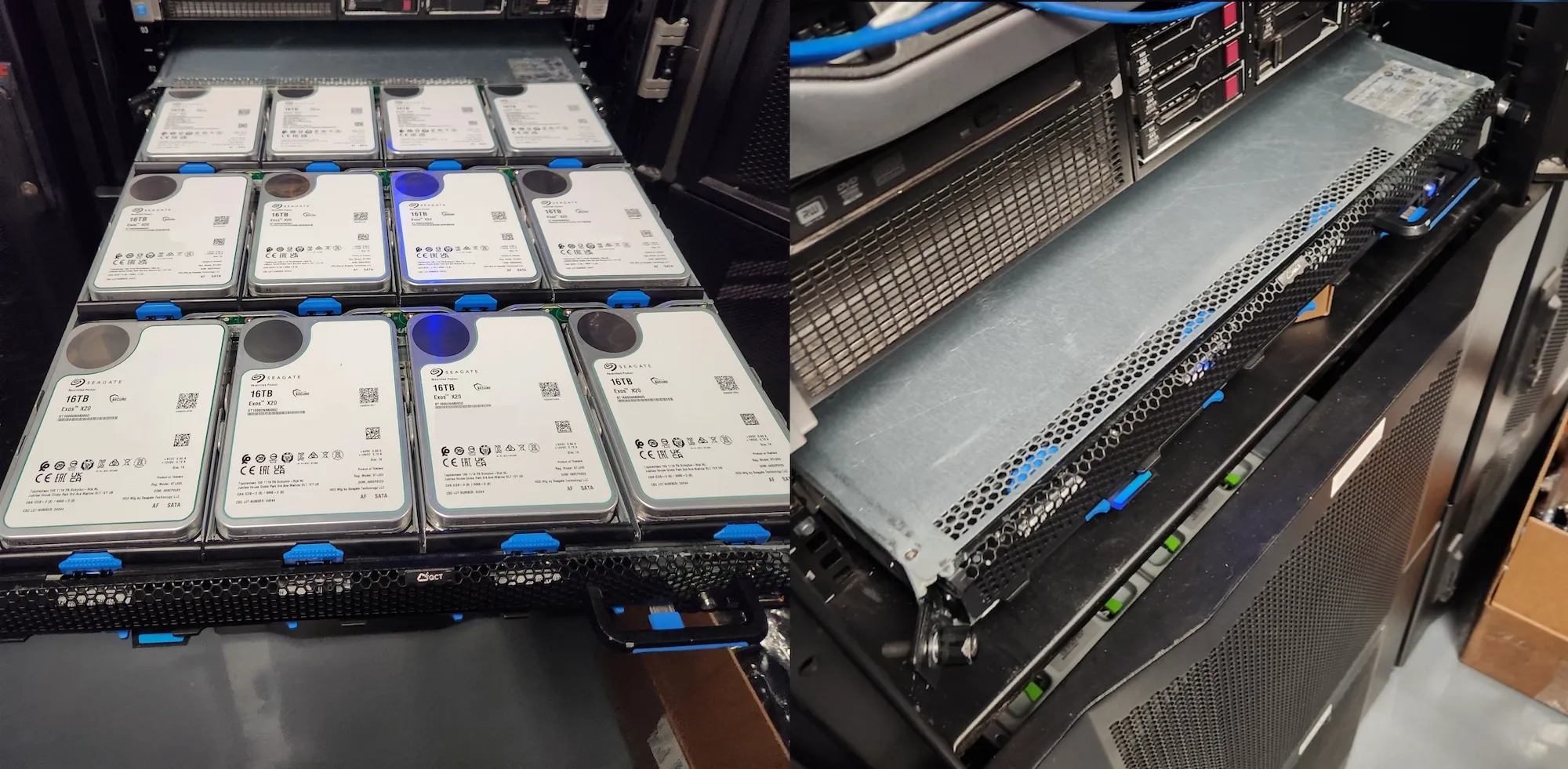
My clearance worked out just right as well. This must be what people mean when they talk about disk shelves.
Quanta BMC/IPMI#
The Quanta has its own baseboard management controller (BMC) for out-of-band management, similar to Dell’s IDRAC or HPE’s ILO. It includes what you’d expect: server availability stats, sensor readings, SNMP, etc. Unfortunately, the remote console you’d use to take control of the server if you make an oopsie relies on an ancient version of Java.
The only way I could get this console to work was with running OpenWebStart and a bit of tinkering. If you happen to find yourself in a situation where you need to remote in, hopefully you have the foresight to figure this out before anything breaks.
Annual firewall swap#
Last year I wasn’t happy with my OPNSense firewall experience and upgraded to a MikroTik CCR2004-1G-12S+2XS. That fixed my issues hitting 10Gb speeds but left me with several other pain points:
- I really don’t enjoy managing MikroTik’s RouterOS configuration flow. Their Winbox GUI doesn’t really click for me and the CLI expects you to know where nested settings live before you can start typing (tab completion is lacking compared to Cisco or regular Linux CLIs). This is a bit of a me problem but I don’t find myself in the RouterOS CLI enough for things to stick.
- Managing config state with tools like Ansible and Terraform is tough if you care about idempotency. The RouterOS API is also not the most ergonomic thing to work with.
- Sorting out which features were correctly supported by hardware offloading for my setup got old pretty fast. I think there’s three different ways to configure VLANs but only one will take advantage of the integrated switch chip. To their credit, Mikrotik has this type of info documented with hardware diagrams and manuals but this needlessly complicates configuration/provisioning management. Since I’m not managing many MikroTik devices, the required time for these setups scales poorly and makes it hard to recommend even if the hardware is cheap.
- There’s no 40GB QSFP+ port to use as an uplink for any core switches and I can’t really take advantage of the 25Gb SFP28 ports.
I mentioned it in my 2023 colo post but there’s not a lot of acceptable alternatives in my budget. That changed this year when Ubiquiti announced their new Enterprise Fortress Gateway Pro. For $2,000 USD, it has an advertised 12.5Gbps in IPS/IDS routing speeds with Ubiquiti’s well-known Unifi OS. This was the first offering from Ubiquiti that had acceptable routing speeds; their Dream Machine Pro Max capped out around 5Gbps and their regular Dream Machine capped at only 3.5Gbps. I’ve got my own problems with Ubiquiti but this seemed very appealing.
A quick aside about my 40Gb/25Gb problem#
For those not familiar, the industry started down the path of >10Gb speeds by setting up lines in increments of 10Gb so a 40Gb QSFP+ link is just x4 10Gb links combined. More recently (~10 years ago…), they opted for 25Gb lines as the smallest increment in these high capacity links. As far as I’m aware, there’s no one producing gimped transceivers for SFP28 to QSFP+ speeds. This means that 40Gb is a dead-end technology wise even if it is perfectly serviceable in smaller deployments like mine.
This isn’t a huge deal since I could set up bonded ports (x4 10Gb ports to a single QSFP+ transceiver) but that won’t scale. Whenever I get around to setting up redundancy with my core switch setup, I’d need x8 10Gb SFP+ ports to chain into two 40Gb QSFP+ ports. I know about these limitations when I bought my 10Gb switch but I didn’t really plan on building a proper core network here.
TL;DR reasoning#
| CCR2004 | EFG | |
|---|---|---|
| Price | ~$500 | $2,000 |
| Third-party monitoring | ✅ In-depth SNMP | ⚠️ Third-party web scraper (Unpoller) |
| Support for Terraform | ⚠️ | ❌ |
| 40Gb QSFP+ ports | ❌ x2 25G SFP28 | ❌ x2 25G SFP28 |
| CLI | ⚠️ | ❌ ClickOps inc. |
| Support | ⚠️ | ❌ Hopes and dreams |
| Isn’t RouterOS | ❌ | ✅ |
| Zero licensing fees | ✅ | ✅ |
The MikroTik clearly comes out on top based on these pros and cons I put together so I ignored all that and bought the EFG anyway. My thinking was that I’d rather choose the option that I hated the least. Whenever I had to add a VLAN or adjust ACLs in my MikroTik, I’d actively put it off. I knew that I’d have issues with whatever I went with in the long run but this seemed like a decent enough compromise.
After running the EFG for a few months, I can say that I’m glad I made the switch. Around the time I switched, Unifi overhauled their firewall rule management with zone-based rules so managing things is even more straightforward than I originally planned. I was most concerned about losing CLI automation functionality but I also got lucky on that front since Ubiquiti decided to start expanding Unifi API endpoints after I switched. I’m looking forward to building on top of these versus any sort of Selenium-based automation I had planned as a workaround.
Notes about support and overall stability#
With my MikroTik, I was never really worried about getting support from MikroTik themselves since they’re pretty bullet proof and the community is very helpful.
In contrast, I know from personal experience just how bad Ubiquiti can be with their hardware and shoddy firmware releases. I’ve seen first hand from day job at an ISP how Ubiquiti treats customers who’ve spent over seven figures on their equipment. There’s a community forum but you’re more likely to find issues and bugs that’ve been around for years versus getting proper help or acknowledgement from their team.
Getting replacement hardware can also be a problem. Ubiquiti rarely publishes updates about hardware stock. It’s not uncommon to see popular items go unstocked for 8+ months. They also have a tendency to silently kill SKUs without notice.
Adding clustered compute#
New servers and networking#
Another thing I wanted to start building on my own gear was a more highly available server setup. To keep it simple, I retired my old 2U HP server running on DDR3 and snagged two reasonably priced Dell R630 servers from a client going through a hardware refresh.
My main goal with this clustered compute setup was to diversify my services across more than one or two hosts which were already peaking both CPU and memory usage. The old Gen8 HP server wasn’t meant to stick around for very long, it was just a spare host I could offload light work onto whenever the need arose. The Dell R630 that I’d previously installed was already specced out nicely with 192GB of RAM and dual Xeon E5-2696v3 CPUs (18 cores, 36 threads @2.3 GHz) so it didn’t make that much sense to squeeze in marginal upgrades as a fix.
With these new servers, I opted to go with bonded 10Gb DACs (x2/server) instead of fiber like I’d done before. Even though I had plenty of spare 10Gb transceivers, the cost for single mode fiber patch cables (~$8/1m) compared to generic 10Gb DACs ($11/1m) was negligible. The power and temperature benefits of going with a DAC setup are bonuses. This also means I won’t have to fight with inconsistent support for my third-party Blade transceivers anymore.
Docker Swarm#
With my odd number of servers, I chose to use Docker Swarm as my orchestration engine. The reason I chose Swarm over something like K8s, or the simpler K3s, was that most of my deployment tools and CI/CD environment was geared toward Docker deployments already. Since I was already in a bit of crunch for adding new compute, Swarm seemed like the decent approach as it didn’t require a lot of retooling on my part.
After running Swarm for a few months now, I mostly stand behind my original reasoning. The biggest pain points have been the smaller community around Swarm and the lack of a clean first-party option for persistent shared storage, which becomes hard to ignore once containers can move between hosts.
My shared storage problem#
Regarding my point about “expected functionality” from Docker, one thing that isn’t handled well is shared storage mounting for handling persistent container data. Some popular services can rely on an S3 backend but that’s far from the norm. I begrudgingly went with NFS mounts despite them not being fully POSIX compliant. This means that I’m leaving myself open to data loss/corruption if I’m not careful. I haven’t run into any issues yet but it’s something I’m always watching. Worst case, I’m pretty paranoid about backups already so my data is only a restore away.
What’s next#
A Ceph cluster looks like the optimal solution here but that’s going to require another two servers for redundancy (per Ceph best practices) and extra networking fiber or DACs to bump each host up to 20Gb to handle cluster traffic. Not to mention a bunch of enterprise-rated SSDs for the storage piece. That shouldn’t be a difficult or expensive project so I’m keen on getting an MVP up and running soon.